How to Calculate ROAS for B2B Lead Generation Campaigns
A practical guide to calculating ROAS for B2B lead gen: why the ecommerce formula breaks, three methods that work with long sales cycles, and what to report to whom.
ROAS is the default metric for evaluating ad spend: revenue divided by cost. But if you’re in B2B, that calculation gets complicated.
Your ads generate leads, not purchases, which can take 3 to 9 months to close. Deals that do finally close touch multiple channels before they sign. Then, your revenue shows up in a CRM, not in Google Ads.
Most B2B teams either report a ROAS number based on made-up lead values, or they skip ROAS entirely because they can’t connect the data. This leads to broken trust with leadership and campaign budgets getting slashed because value can’t be proven.
Why the Ecommerce Formula Breaks in B2B
The standard ROAS formula is straightforward:
ROAS = Conversion Value / Ad Spend
In ecommerce, that works. Someone clicks an ad, buys a product for $80, and Google Ads tracks the transaction. You spent $20 on the click, the conversion value is $80, your ROAS is 4:1.
In B2B lead gen, every assumption behind that formula falls apart.
The conversion isn’t a sale. It’s a form fill, a demo request, or a phone call. That form fill might become a $500K deal or it might be a college student doing research. Google Ads doesn’t know the difference. It counts them both as conversions.
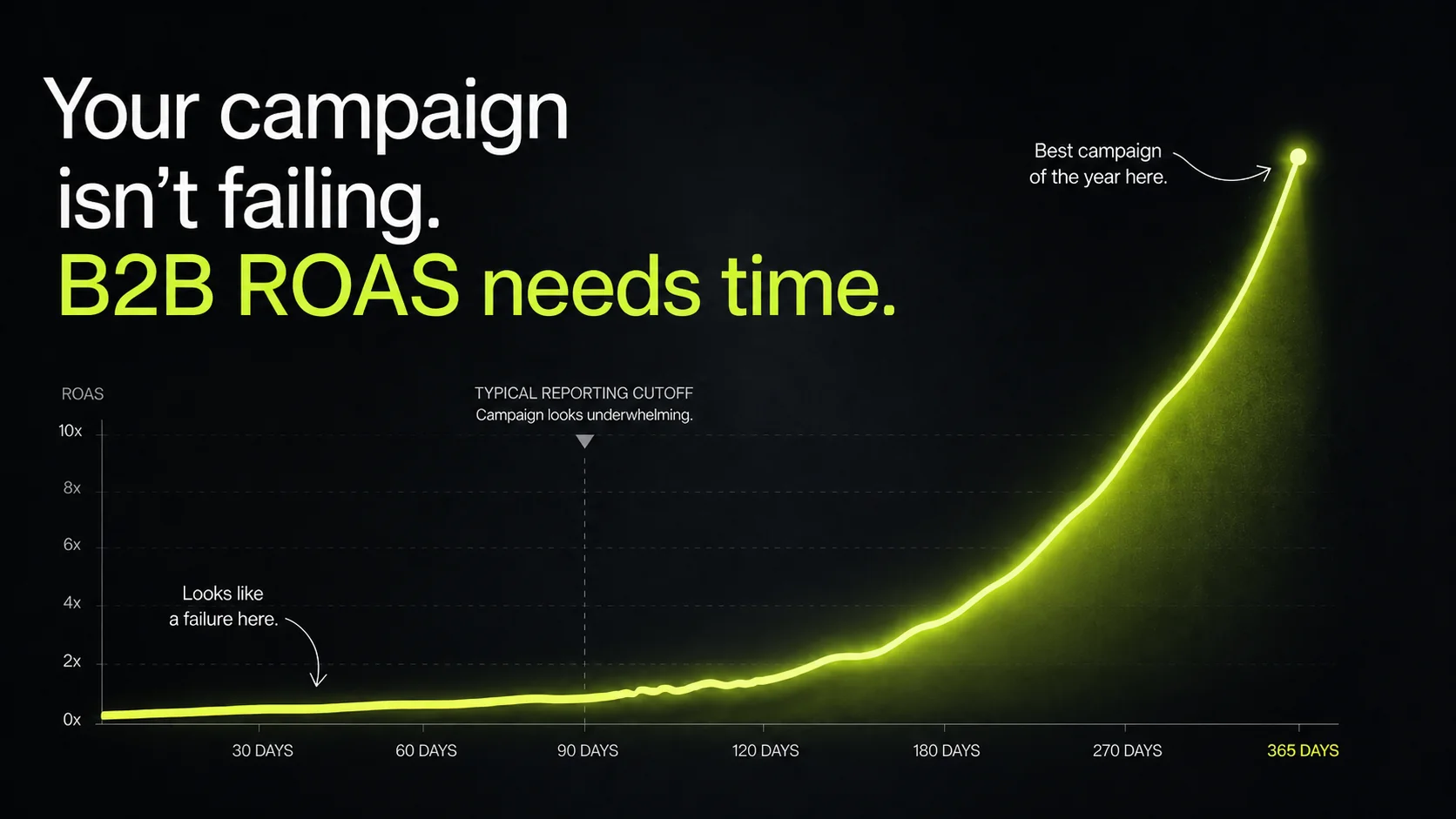
The revenue doesn’t show up for months. If your average sales cycle is 90 days, a lead from a January campaign won’t close until April at the earliest. If you check ROAS in February, the campaign looks like a total loss. Check again in June and it might be your best performer.
The revenue lives in a different system. Deal values are in HubSpot or Salesforce, not Google Ads. Unless you’ve built a bridge between them, your ad platform has no idea what happened after the form fill.
And the conversion values vary wildly. In ecommerce, a product costs what it costs. In B2B, one lead could be a $5K deal and the next could be a $500K deal. Averaging them together produces a number that describes nothing related to actual performance.
The Wrong Ways B2B Teams Try to Solve This
When B2B teams can’t calculate real ROAS, they improvise. Most of these workarounds cause more problems than they solve.
Assigning a flat dollar value to every lead. This is the most common approach. “Every form fill is worth $100.” It’s also the most misleading. A VP of Operations requesting a demo is not worth the same as someone downloading a PDF to procrastinate at work. But Google Ads treats them identically. Your ROAS number looks stable, but it means absolutely nothing.
Using Google’s estimated conversion value. Same problem in a different wrapper. Google doesn’t know lead quality. It knows a conversion happened, but has little to no context about what it actually means for your business.
Reporting cost per lead instead of ROAS. CPL is useful as an efficiency metric but it tells you nothing about return. A $50 CPL is great until you find out none of those leads closed. A $500 CPL sounds terrible until you find out those leads close $200K deals at a 20% rate. Without connecting spend to revenue, CPL is just a cost number.
What You Actually Need to Calculate B2B ROAS
Real ROAS in B2B requires connecting your ad platforms to your CRM. There’s no shortcut around this. Here’s what the data flow looks like:
Ad platform (Google Ads, LinkedIn, Microsoft Ads) tracks your spend and captures the initial conversion, such as a form fill, a call, a demo request, etc.
Your website captures the source data at the moment of conversion. This means UTM parameters on your landing page URLs, hidden form fields that store the click ID (GCLID for Google, MSCLKID for Microsoft), and source/medium/campaign values that get passed into your CRM with the lead record.
Your CRM (HubSpot, Salesforce) is where the lead progresses through your pipeline. Lead to MQL to SQL to Opportunity to Closed Won. Each stage change is tracked. The deal value is entered when an opportunity is created, and revenue is recorded when it closes.
The bridge between ad platform and CRM is what makes ROAS calculable. This can be a native integration (HubSpot has a Google Ads integration that syncs lifecycle stage data back to Google), an offline conversion import that pushes CRM events back to Google Ads, or a manual match using click IDs and timestamps.
The offline conversion import is especially valuable because it doesn’t just give you ROAS data. It teaches Google’s algorithm which clicks lead to real customers. Once Google knows that, it optimizes toward finding more people like them instead of optimizing for form fills.
If you don’t have this infrastructure today, you can still calculate ROAS. It just requires more manual work and the numbers will be less precise.
Three Ways to Calculate B2B ROAS
Method 1: Pipeline as a Directional Signal
Before you can calculate real ROAS, you need to know whether your ad spend is even generating pipeline. This isn’t a return metric, but it can help establish if your campaigns are generating measurable opportunity. Most teams can do this today if they have deal values in their CRM and basic lead source tracking.
The question it answers: Is our ad spend creating real sales opportunities, or are we just collecting form fills?
Example:
You spent $25,000 on Google Ads in Q1. Those campaigns generated 150 leads. Of those, 40 became opportunities with a combined pipeline value of $620,000.
That $620,000 is not your return. But it tells you the spend is reaching the right people and generating conversations your sales team can actually work. If you spent $25,000 and generated $30,000 in pipeline, you’d know something is wrong before waiting 6 months for deals to close.
When to use this: When you’re early in building your measurement system and don’t have enough closed-deal data to calculate real ROAS yet. Also useful as an ongoing directional metric even after you’re reporting on closed-won numbers.
Method 2: Closed-Won ROAS
Formula: Closed-Won ROAS = Closed Revenue from Ad-Sourced Deals / Ad Spend
Example:
You spent $25,000 on Google Ads in Q1. Over the next 6 months, the leads from that Q1 spend generated $186,000 in closed revenue.
Closed-Won ROAS = $186,000 / $25,000 = 7.4x
What this tells you: For every dollar you spent, you got $7.40 back in actual revenue. That’s a real business number you can take to a CFO.
The catch is time lag. If your sales cycle is 90 days, you can’t calculate Q1’s closed-won ROAS until at least Q3. That creates a reporting gap where you’re spending money and can’t prove return yet.
The solution is cohort reporting. Don’t measure ROAS by calendar quarter. Measure it by spend cohort. All leads generated by Q1 spend are one cohort. Track that cohort’s revenue over time: 30 days, 60 days, 90 days, 180 days, 365 days. The ROAS number gets bigger as more deals close. This is how you show leadership that ad spend is working over long sales cycles.
Example cohort view:
| Q1 Spend Cohort ($25K) | Pipeline | Closed Revenue | ROAS |
|---|---|---|---|
| At 30 days | $280,000 | $0 | 0x |
| At 90 days | $540,000 | $42,000 | 1.7x |
| At 180 days | $620,000 | $186,000 | 7.4x |
| At 365 days | $620,000 | $248,000 | 9.9x |
If you only looked at the 30-day number, you’d kill the campaign. If you waited, you’d see it was one of the best investments the company made all year.
Method 3: Weighted Pipeline ROAS
This method is for teams that have enough historical data to know their close rates by pipeline stage. It lets you project ROAS forward instead of waiting for deals to close.
Formula: Weighted ROAS = (Closed Revenue + (Open Pipeline × Historical Close Rate by Stage)) / Ad Spend
Example:
Same $25,000 Q1 spend. At the 90-day mark, you have $42,000 in closed revenue plus $180,000 in open pipeline at the SQL stage. Your historical SQL-to-close rate is 35%.
Weighted value of open pipeline = $180,000 × 0.35 = $63,000
Weighted ROAS = ($42,000 + $63,000) / $25,000 = 4.2x
What this tells you: Based on what’s closed plus what’s likely to close based on historical patterns, you’re projecting a 4.2x return. It’s not guaranteed, it’s just a forecast. But it’s a far better forecast than either “0x because nothing closed yet” or “22x because look at all this pipeline.”
When to use this: When leadership wants a ROAS number before the full sales cycle has played out and you have at least 6 to 12 months of historical close rate data to base the projections on.
Accounting for Multi-Touch Attribution
Here’s where it gets complicated. A lead’s first interaction was a LinkedIn ad. They came back through organic search a week later. Then they clicked a Google ad. Then they attended a webinar. Then they typed your URL directly and requested a demo.
Five touchpoints. One deal. Who gets the ROAS credit?
There’s no perfect answer to this. But there are a few models that are good enough to be useful.
First-touch attribution gives all credit to the channel that started the relationship. In the example above, LinkedIn gets 100% of the revenue credit. This is the best model for answering “which channels are sourcing new business?”
Last-touch attribution gives all credit to the channel that closed. Direct traffic gets the credit here, which can be misleading. This is why last-touch is not always the most useful model for B2B even though it’s the default in most platforms.
Linear attribution splits credit evenly across all touchpoints. Each of the five channels gets 20% of the deal value. Fair but diluted. Nothing looks great, nothing looks terrible.
Position-based attribution gives 40% to the first touch, 40% to the last touch, and splits the remaining 20% across the middle. Heavier weight on the channels that started and finished the deal, lighter weight on the ones in between.
Our recommendation for most B2B teams: use first-touch for your primary ROAS reporting. It answers the question that actually drives decisions: “where should I spend my next dollar to source new business?” Use multi-touch as a secondary view for understanding which channels show up in the journey of deals that close.
The Lag Problem
This is where most B2B teams get in trouble. A campaign launches. Leadership checks ROAS at the 30-day mark. The number is 0x or close to it because leads haven’t had time to progress through the pipeline. Someone panics, and the budget gets cut. The campaign that would have been profitable at the 180-day mark never gets the chance to prove it.
Here’s a realistic timeline for a B2B company with a 90-day average sales cycle:
Days 1-30: Leads are coming in. Most are still in early qualification. Pipeline is forming but almost nothing has closed. ROAS looks terrible, but this is normal.
Days 30-60: MQLs are being worked. Some have become SQLs. A few fast-movers might close but they’re the exception. Pipeline numbers are starting to look reasonable. Closed-won ROAS is still very low.
Days 60-120: The bulk of conversions from high-intent leads happen here. Closed-won ROAS starts to reflect reality. This is the earliest point where you can reasonably judge whether a campaign is working.
Days 120-365: Longer-cycle deals continue to close. ROAS keeps improving. Some large enterprise deals that originated from these campaigns might not close for 9 to 12 months.
The rule of thumb: Don’t make budget decisions on closed-won ROAS until you’ve waited at least 1.5x your average sales cycle. If your average cycle is 90 days, wait 135 days minimum. Until then, use leading indicators: lead volume, lead quality (MQL rate), pipeline value, and cost per SQL. These tell you whether the campaign is on track before the revenue confirms it.
What to Report and to Whom
Different stakeholders need different ROAS views. Sending the wrong number to the wrong person creates confusion or worse, bad decisions.
For the PPC manager or strategist: Campaign-level and keyword-level performance, tracked monthly using pipeline generation (Method 1) as a leading indicator and refreshed quarterly with closed-won ROAS (Method 2). This is the operational view that drives optimization decisions. Which campaigns are producing pipeline? Which keywords generate leads that actually close?
For the marketing director or VP: Channel-level ROAS comparing Google Ads, LinkedIn, Microsoft Ads, and other paid investments against each other. Use cohort reporting so they can see how Q1 spend is maturing over time. Include both pipeline and closed-won numbers so they can see where things stand now and where they’re headed.
For the CFO or CEO: Blended program-level ROAS with a trend line. Total ad spend across all channels, total revenue attributed to paid media, and the ratio between them. Keep it simple. Show the trend. If ROAS is improving quarter over quarter, that’s the story. If it’s declining, they need to know why and what you’re doing about it. This audience does not need campaign-level detail. They need the answer to “is our ad investment making money?”
Where To Go From Here
ROAS in B2B isn’t a single number you calculate once. It’s a system that gets more accurate over time as deals close and data accumulates.
If you have nothing today, start by tracking pipeline generation from your ad spend. You can probably do that this week with your existing CRM data. It won’t give you a return number but it’ll tell you whether the money is reaching the right people.
Once you have 6 months of closed-deal data, graduate to closed-won ROAS by cohort. That’s the number that holds up in a board meeting.
If you have strong historical close rates, add a weighted pipeline to give leadership a forward-looking view before the full sales cycle plays out.
One more metric worth building toward: customer acquisition cost by channel. Once you can calculate how much it costs to acquire a customer through paid ads versus organic versus outbound versus referrals, you know which channels are actually efficient and which ones just look busy. ROAS tells you whether a channel is profitable. CAC by channel tells you where to invest your next dollar.
Want a strategy built around this? Get a free B2B marketing diagnostic →